• Home
  • About
  • Life Style
    • Adventures in Japan
    • Food
    • Otaku Related
    • Personal Life
    • Reviews
    • Events
  • Links
  • Contact
YouTube carrd twitter instagram

mika's online diary


It's a new year already! 2015 has been a kawaii year, but here's to hoping for a more kawaii 2016! So for my first post in 2016, it's a tutorial on how to save your Purikura's on your phone (HD)! A few people have asked me on how I saved mine since the instructions provided on the Purikura Machine itself is kind of hard to follow, since they're in Japanese and the instructions are like crazy fast, I'll tell you how I got my HD picture!


Like this! I didn't have this scanned, I actually tried scanning the pictures, but they were really not that good in terms of quality~ so! First things first, where to get your Purikura of course!


(from Kawaii PH)

These Purikura Machines are currently available at Kidzoona in Fairview Terraces for 150 php! You get 2 strips for that price after you've taken and designed your photo! There are 4 Purikura machines in the mall and they're all beside each other so you get to choose which one you like!

Me and my boyfriend Mike tried the Me <3 Her Jyoshi! It's kind of overwhelming at first but it's pretty much simple to use! So once you're at the end part, the machine will ask you if you want to save to your phone, and will make you choose 2 photos that you want to save.  You'll get the strip and at the bottom notice an ID number


I covered mine lol! But don't worry! this doesnt mean that you can only save those 2 photos you chose! Technically, they'll be the "free" to save pics! First things first, download the application!


The App name is Puripix and you can DL this in apple store (not sure if they have this for android) it's a free application so no need to worry!


Once that's open, this would pop up! and you need to enter the ID number of the Purikira strip! once entered, it'd take you to a page where you can the chosen photo with a tag "free" on it, and your other photos with a padlock on it!

So go ahead and save the one with the free tag on it, and if you have a credit card or visa debit card, you can buy a ticket worth 0.99$ only and unlock ALL your other photos! which is actually what I did!

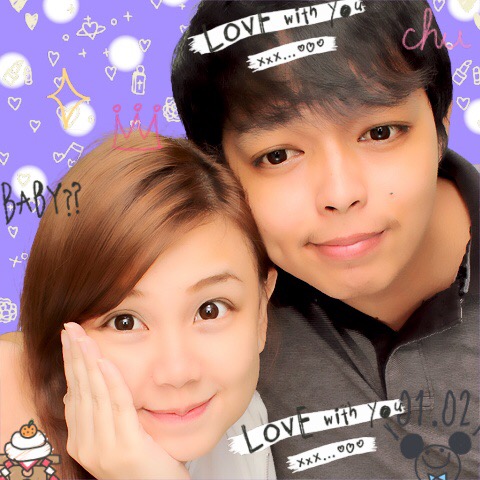


I love how it's HD! hihi~ I wasn;t able to unlock all my photos for the second strip (since I forgot to deposit money in my visa debit card) but I was able to save 2 photos! Since you do have 2 ID numbers in 1 strip! So be sure to download all your photos! 

Important note: The server will only keep your pictures for 1 week! 

So be sure to try to get all your Purikura photos! will be getting mine tomorrow as well! lol 

Anyway! so that's how you get your HD copies of your Purikura photos!

Hope this was a bit helpful for you guys!

Happy 2016!
Share
Tweet
Pin
Share
3 comments
Hi guys! just wanted to share the good news to the peeps, Neoprint or Purikura machines are now back in Manila!! 


I'm super happy since I've never been able to try like the super legit Purikura machines (just the lame ones at like arcade centers that do not even come close to the purikura awesomeness!)

This can be found in Kidzoona at Fairview Terraces! The tokens are worth 200 php! It's not that close but also not that far from where I live, but would definitely go and have my pic taken!! lol!

(Thank you Master Kaila, Mommy Chichi and Sinsan Kaye!)

And! just a small announcement, the Kawaii PH team is actually in the middle of organizing a super kawaii halloween party! 


we're still finalizing everything and waiting for other things to fall into places, but we'll be posting more details soon so stay tuned in our FB page to find out more!
hihi!

Spookeeh!~
Share
Tweet
Pin
Share
2 comments
Hi kawaii readers! So if some of you didn't know, Kawaii Philippines had a mini campaign entitled Purikura PH! I wrote an article on the Kawaii PH website on the Top 5 Kawaii Purikura Apps I personally use and decided to have a small gimmick to make people a little closer to Kawaii PH! So, we decided to create a Purikura Campaign! 
Here's a sample of a purikura edit I made~


It’s every kawaii girl’s dream to take photos at a purikura booth, but sadly, here in the Philippines, there’s little to no purikura photo booth at all. And if there is, it’s actually quite difficult to locate or find the good ones! That’s why some settle for phone applications that help them edit their photos to achieve that kawaii look of a purikura picture!
In most cases, when we try to search for “purikura apps” on our app store or play store, hundreds of results come up and usually, the ones you download include cute stickers, photo enhancement filters and girly borders… but you don’t really get the “Purikura” effect you’re after! To help the kawaii girls (and boys) out there with this frustrating predicament, I have laid out the top 5 purikura apps (in my opinion of course, and these are what I personally use as well) that are available for download!
These applications do not only have kawaii stickers and borders, but also have the ability to add the purikura eye effect, the “motion” or continuous stickers, bright filters, and edit the background!
To read more and to see the whole list with all the details of the Purikura App, just visit our website or click this link! http://kawaii.ph/beauty/top-5-kawaii-purikura-apps/ 

And now, I will be featuring some of the Kawaii entries we got from our Kawaii supporters who "purikura-fied" their pictures with the suggested apps and made their photos super kawaii!

Here are the Kawaii-fied/purikura-fied kawaii photos!


Aren't they all super cute? Some of them used Girl's Camera, some used Qtiie.JP app, and everyone seemed to enjoy using the apps I suggested and yep! they are all Kawaii!

Kawaii PH model Wynona (VanillaFairy) also used one of these apps!


She's wearing the new Princess collection by non other than Dolly Kaye (Kaye Romero!)
She's super duper cute and the app she used is Qtiie.JP and she uses it perfectly!

Thank you to everyone who participated in this mini campaign! will be holding more of these campaigns in the coming months~ so please look forward to it!

Bye lovelies!

Share
Tweet
Pin
Share
1 comments
Older Posts

About me


Iff62X.png

31 | MNL ~ JPN | 日本語 Translator | Fujoshi | Otaku | Pokemon Master | Dog mama |

Find Me

  • carrd
  • twitter
  • youtube

Blog Archive

  • ▼  2020 (4)
    • ▼  March (4)
      • Animal Crossing New Horizons - House Tour!
      • Pokemon Cafe Tokyo 2020
      • life lately
      • life update : hello 2020
  • ►  2019 (13)
    • ►  July (4)
    • ►  April (6)
    • ►  March (2)
    • ►  January (1)
  • ►  2018 (2)
    • ►  February (2)
  • ►  2017 (24)
    • ►  November (1)
    • ►  September (1)
    • ►  July (2)
    • ►  June (1)
    • ►  May (5)
    • ►  April (3)
    • ►  March (5)
    • ►  February (1)
    • ►  January (5)
  • ►  2016 (44)
    • ►  December (2)
    • ►  November (2)
    • ►  October (5)
    • ►  September (3)
    • ►  August (2)
    • ►  July (4)
    • ►  June (4)
    • ►  May (2)
    • ►  April (4)
    • ►  March (3)
    • ►  February (6)
    • ►  January (7)
  • ►  2015 (74)
    • ►  December (5)
    • ►  November (4)
    • ►  October (5)
    • ►  September (2)
    • ►  August (3)
    • ►  July (11)
    • ►  June (7)
    • ►  May (4)
    • ►  April (7)
    • ►  March (6)
    • ►  February (10)
    • ►  January (10)
  • ►  2014 (19)
    • ►  December (6)
    • ►  November (7)
    • ►  October (6)

♡Blog Views♡

♡顧客さん♡

Flag Counter

2020 © m a r o t e s q u e by Micaela

Created with by ThemeXpose